Just the other day, I was in attendance at a meeting with one of my consulting clients, his paid advertising rep, and a rep from his web design vendor.   I was there as the content consultant and provider – when I came on board, my client already had established relationships with a web design company and other vendors.

My client (who is the owner of a thriving personal services law firm) expressed his frustration at the lengthy delays in getting sites created and online – he noted that the production of his most recent site has taken almost 6 months.   It seems that every revision takes at least a week to get implemented.  In fact, I suspect that it was this delay that prompted him to call me – as an attorney I can prepare content about legal topics.  By contrast, his web design company was using writers who were not lawyers, nor were they knowledgeable about the legal issues addressed by the web site.   As such, they would produce content that contained factual errors, someone from my client’s office would review and point out the mistakes, then it would go back to a writer for revision, more mistakes would be made and the process would repeat itself over and over.  Because our client’s web site was being developed in a proprietary development environment, the web site designer was the only person who could make any updates.

Just a note, by the way, for those of you who want to outsource content about a technical topic or one where unique knowledge is necessary, you will need to be involved in the content creation process – otherwise you will face ongoing frustrations.

During this conversation, the paid advertising rep and I looked at each other and almost simultaneously asked “why are you not using WordPress to produce this site?

WordPresslogoWordPress, as you may know, is an “open source” blogging platform that is widely used and very flexible.  Open source means that there is no cost whatsoever to download the software and there are a plethora of “plug-ins” that add flexibility to the base software’s functionality.  The site you are now reading is a WordPress site.

Because it is open source software that has reached critical mass in terms of its use and popularity, the software is regularly updated and upgraded.  Anyone is free to suggest proposed changes to the software – the supervising engineers review these suggestions and incorporate the best of them into the production updates.   I suspect that for many of the volunteer programmers, a development credit on the WordPress site would be valuable resume fodder as well as positive publicity within that developer community.

I first started using WordPress around 2 years ago.  At that time, WordPress was primarily a blogging platform.  Since that time, the software has been significantly upgraded to the point where it can function as the backbone to a more traditional looking web site.  In fact, I have seen WordPress used as the structure for a multi-user membership site, a storefront site for selling multiple items and just about any other application you could imagine.

More recently, I have been using WordPress to create web sites, rather than my previous site authoring tool – a program called NetObjects Fusion.  Other common web authoring tools include FrontPage (a Microsoft product that has now been discontinued), and Dreamweaver. [click to continue…]

{ 0 comments }

What Name Should You Choose for Your New Website or Blog?

choosing a good domain nameWhen you decide to publish a new website or blog, one of your first decisions will have to do with the domain name or URL of the site.  If I am not involved from the outset, there may not be much I can do about this decision, although I certainly wish that I could change many of the URL’s I see.

In my consulting practice I regularly work with lawyers, although I see the same issues in many businesses.  Law firms usually contain the name of the partners, i.e. Engulf, Devour, Cheatham & Howe.  A firm like this is likely to choose a URL that reads something like this:  www.edch-law.com.

In my view, a URL like edch-law.com is a poor choice.  Firstly, it is not something that most people will remember and given the many images and impressions foisted upon each of us every day, it is certainly better to choose an easy to remember name.   I have a bankruptcy domain name called “moneylawyer.com” – wouldn’t you agree that moneylawyer is much easier to remember and spell than some random series of letters with a dash. [click to continue…]

{ 1 comment }

Beware of Malicious Twitter Invitation

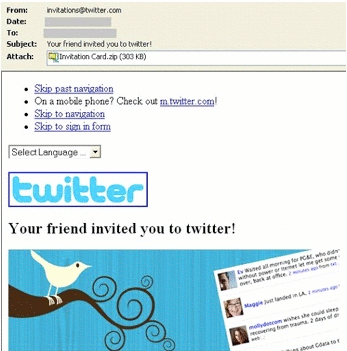
Peter Cashmore of Mashable.com reports that a spoof email is circulating around the Internet inviting users to connect via Twitter.  Instead of containing a link, the spoof asks users to download a zip file which contains a nasty email harvesting worm.

Here is a photo of the fake email:

Twitter Worm

As Peter notes, this spoof capitalizes on the fact that Twitter has become very well known, meaning that people who don’t know much about it might still be inclined to download a file.  A legitimate Twitter invite, of course, contains a link to the inviter’s Twitter page where you can click to follow or block.

I suspect that some hacker will soon corrupt this process, meaning that like PayPal, you will want to avoid directly clicking a link in an email – instead you will want to head directly to your Twitter account and deal with followers directly from your home base.

{ 0 comments }

Those vacation or other personal photos that you upload to Flickr, SmugMug, Picasa or other picture repository sites may not remain private.  England’s Guardian newspaper reports on its web site that a Missouri family’s Christmas card photo ended up in a grocery store ad for a company in Prague, Czech Republic.   A family friend of Jeff and Danielle Smith spotted the photo on a billboard advertising the grocery store’s home delivery service.

Smith Family Photo

The Smiths, to their credit, have leveraged the free exposure.  Danielle Smith’s blog, ExtraordinaryMommy.com has received thousands of visitors and hundreds of incoming links (like this one) as this story circulates around the web.

The lesson: do not post any photo onto a photo sharing site that you do not want appearing on a billboard in an eastern European country, and leverage web traffic any way you can!

{ 1 comment }

Often, you will want to include your contact information – including your email – in articles or blog posts that you write.  Many programs automatically convert email addresses in to clickable links that open your pre-set email client.

For example, if I am reading an article on a blog about a doctor or lawyer and that professional’s email address is hyperlinked, all I need to is click on the link to open my email program (in my case Gmail, but it could be Outlook or Yahoo Mail or any one of several).

By contrast, if the email address is not a link, I will have to manually open my email program, past the address and then send the email.

In my first web sites, I intentionally made my contact email addresses hyperlinks so colleagues and potential clients could easily contact me.

Big mistake.

Spammers use programs called “bots” to troll the web and harvest these clickable email addresses. Within a few months, my firm email address was (and is) essentially useless because of all the junk that arrives daily. I still keep it active because a lot of people over the years use that email address and I am reluctant to close it.

For years I have recommended to my clients that they use email forms (like the one on this site) rather than live, clickable email addresses. If you do not want to devote the real estate to a form on your site, you can put the form on a separate page, then use a link shortening service like tinyurl.com or cli.gs and post that address.

I recently learned about another solution called HideText.net. This free service takes any line of text, such as emails and converts it into a graphic.   Here is an example:

Jonathan email address

This email address a graphic and thus not currently readable by spambots. A nice and elegant tool.

{ 0 comments }

WordPress Users – Check Your Feedburner Links

If you use WordPress (like I do), you may direct your RSS feeds through Feedburner.  When you run your feeds through Feedburner, you gain access to a variety of free analytical tools that can help you better understand and count your audience.  In addition, Feedburner allows you to monetize your content by adding services like AdSense to your feeds.  Feedburner is now owned by Google, which means that you can expect even more capacity for analytics and statistics.

For whatever reason, Feedburner has decided to change the syntax of the feed link.  Until recently, a Feedburner feed looked like this:

feeds.feedburner.com/yourblogname

Now, the syntax includes the number “2″ as follows:

feeds2.feedburner.com/yourblogname

When you install the Feedburner plug-in on your blog, you will see an entry screen at “Settings” to type in your Feedburner feed address.  If, like me, you set up your Feedburner plug-in several months ago without the “feeds2″ syntax, your RSS link will go to a dead link.

You can fix this problem easily by logging in to your WordPress blog and changing the Feedburner address to show feeds2.feedburner.com instead of feeds.feedburner.com.

{ 0 comments }

Useful Tool – Atomic Clock Sync

What time is it?  Not “approximately” but down to the nano-second.  Check out the Atomic Clock Sync utility from WorldTimeServer.com.  Now in Version 3.0, Atomic Clock Sync automatically synchronizes your computer’s clock to National Institute of Standards and Technology.

I also use a utility called “L-Clock” which puts a configurable clock on my System Tray.  Now I will always know what time it is, despite my wife’s insistence that time has no meaning for me!

There are, of course, many reasons to have an accurate clock.  If you use an online backup program, for example, you will want to schedule your backups for 3AM when you are most likely not online.  An accurate system clock insures that your scheduling does not cause a utility to run when you need full processing power.

Atomic Clock Sync can be run manually, or set for automatic updates.  Highly recommended.

{ 0 comments }

Useful Tool – FriendFeed

If you use the Internet for business, you have no doubt come across numerous social networking sites.  There are a mind numbing number of these sites, all of which help you share what you are doing with the world, and to establish relationships with others who share common interests.   Examples of these social networking sites include:

  • Twitter
  • Facebook
  • LinkedIn
  • YouTube
  • StumbleUpon
  • del.icio.us
  • digg
  • flickr
  • yelp
  • Mixx
  • Reddit

These social networking sites can be useful if you want to learn what industry leaders are doing and thinking.  I frequently learn about new tools, websites and tactics from some of the people I follow.

The problem, of course, is time.  How do you follow a couple dozen thought leaders on multiple networking sites?  One elegant solution is called FriendFeed.  FriendFeed is basically a social networking site aggregator.  Once you sign up as a user, you enter all of your social networking feeds into a simple form, then save.  Next, you allow FriendFeed access to your email account to search for other FriendFeed users.

You can then “subscribe” to other FriendFeed users and other users can “subscribe” to you.  Every day thereafter, FriendFeed will send you an email digest of posts and activity by those in your subscription list.  This email digest is a fast and convenient way to keep up with any social networking activity by those on your list, all in one place.

Obviously the big drawback is that you can only subscribe to your target if that person has a FriendFeed account.  Still, for those who do participate in this service, it is a breeze to quickly track what they are up to.

If you are interested and want to subscribe to me, the link is http://friendfeed.com/jginsberg.

{ 0 comments }

Useful Tool – Foxmarks

In my view, one of the nicest things about the Internet relates to the multitude of “free” tools and resources out there.   This free stuff may not last forever (if you are old enough to remember the original Napster – and its promise of “free” music, you know what I mean).  In the meantime, I will periodically post reviews about some of the free stuff that I actually use.

The first tool I want to discuss in this series is called Foxmarks, which you can find at Foxmarks.com.  Foxmarks is an add-on to the popular (and free) web browser Firefox.  It syncs and backs up your bookmarks and passwords across multiple computer.  Here’s how it works for me:

I work on three computers regularly – my office desktop computer, a laptop that I take with me everwhere, and a home machine that I use primarily for video editing.  Before Foxmarks, I had three different lists of bookmarks (favorites).  If I saved a site to Favorites at home, that site would obviously not appear on my Favorites list at work unless I wrote myself a note or sent myself an email.

Foxmarks works by creating a web based “master bookmarked favorites” list.  If you install the Foxmark add on to each computer and then log in to your web based account, Foxmarks sychs all of your bookmarks and each machine has an identical “Bookmarks” list of favorite sites.

You can also log in to your master list from any computer to access it, thereby making your bookmarks portable.  A new feature adds password portability to the service but I have not yet activated that.

The add-on also reminds you to synch your local machine to the web based master list if you add a site to the local Favorites list of any computer that you happen to be on at that time.  All in all, Foxmarks functions as an essential tool in a world where more and more people own or work on multiple computers.

Foxmarks gets my highest recommendation as an essential tool.  Here is a link to the Foxmarks blog if you want to learn more about the service and about forthcoming features or if you want to post a question.

I have no idea how Foxmarks makes money, although I do note that its founder is Mitch Kapoor, who gave us Lotus 1-2-3 back in the early days of the PC.  Presumably Mitch doesn’t need any angel investors.

One clue to what Foxmarks may have in mind can be found in its about us page:

We are hard at work analyzing over 300 million bookmarks managed by our systems to help users discover sites that are useful to them. By combining algorithmic search with community knowledge-sharing and the wisdom of crowds, our goal is to connect users with relevant content.

Sounds like a social networking application may be on the drawing board.  Whatever they do I’ll certainly check it out as these folks have saved me hours with a must-have application.

{ 0 comments }

Search this site